
How to Program a Ford 6R140 or 10R140 Valve Body Using FORScan
A Step-by-Step Installation Guide from Thompson Transmission
Replacing the valve body in your Ford Super Duty is only part of the job. Depending on your transmission and model year, the replacement valve body may also require solenoid body strategy programming and transmission adaptive learning procedures before it will operate correctly.
At Thompson Transmission, we want our customers to have the information they need to properly install and set up their replacement transmissions and valve bodies.
This guide walks you through using FORScan to complete the supported programming and adaptive reset procedures for Ford 6R140 and 10R140 transmissions.
What You'll Need
Before getting started, make sure you have:
-
A Windows laptop with FORScan installed
-
A compatible OBD-II adapter, such as the OBDLink EX
-
A battery charger or programming power supply
-
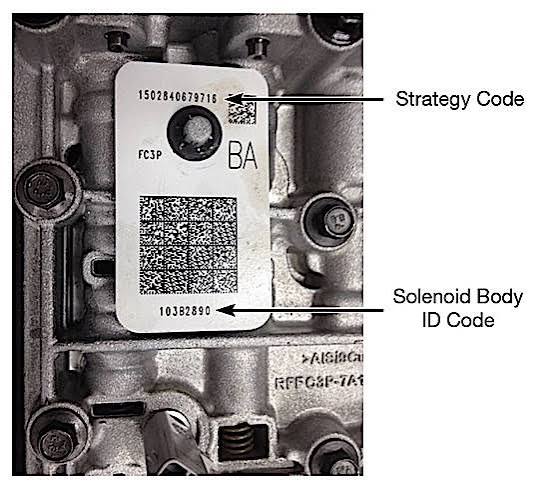
The solenoid body strategy and identification information supplied with your replacement valve body
Step 1: Locate Your Valve Body Strategy Information
Before installing your replacement valve body, locate the solenoid body identification information supplied with the assembly.
On applicable Ford units, this typically consists of a 13-digit solenoid body strategy and an 8-digit solenoid body identification number.
These numbers are specific to the solenoid body and must match the replacement assembly.
We recommend taking a picture of the identification label before installation so the information is readily available when programming. (Figure 1 6R140) The 10R140 will be etched into the casting.

Step 2: Connect FORScan to Your Truck
-
Park your truck safely and apply the parking brake.
-
Connect a suitable battery support charger.
-
Plug your OBD-II adapter into the diagnostic port underneath the dashboard.
-
Connect the adapter to your laptop.
-
Turn the ignition to the ON position without starting the engine.
-
Open FORScan and click the Connect to Vehicle icon.
-
Allow FORScan to identify your vehicle and available modules.
Once connected, check for any existing transmission-related trouble codes and record them before continuing.
Step 3: Program the Replacement Valve Body
After FORScan connects to your vehicle:
-
Select the Configuration and Programming tab, represented by the microchip icon.
-
Review the available PCM or TCM programming functions.
-
Look for a function labeled solenoid strategy or identification programming.
-
Select it and click Run.
-
Follow the instructions displayed by FORScan.
-
Enter the strategy and identification information supplied with your replacement valve body when prompted.
-
Double-check the numbers before confirming.
-
Allow the programming process to finish without disconnecting the adapter or interrupting vehicle power.
-
Cycle the ignition.
Do not reuse the original valve body's strategy information unless it is confirmed to match the replacement assembly.
If FORScan does not display a supported solenoid strategy programming function, do not attempt to substitute an unrelated module configuration or As-Built programming function.
Step 4: Reset Transmission Adaptive Learning
Once the required strategy programming is complete, the next step is to reset the transmission's adaptive learning values if required for your application.
These values are learned by the transmission control system over time to compensate for changes in clutch engagement and shift characteristics.
To perform a supported adaptive reset:
-
Return to the FORScan main screen.
-
Select the Service Functions tab, represented by the wrench icon.
-
Locate the Clear Transmission Adaptive Tables function.
-
Select the function and click Run.
-
Follow the instructions displayed by FORScan.
-
Wait for the procedure to finish.
-
Cycle the ignition.
Remember: Resetting adaptive learning does not replace solenoid body strategy programming. Both procedures may be required.
Step 5: Complete the Transmission Relearn Procedure
After programming and resetting the appropriate adaptive values, your transmission requires an adaptive relearn procedure.
Before beginning, verify the transmission fluid level and bring the transmission to the operating temperature specified in the applicable Ford service procedure. (120 degrees)
- 0-80 MPH @ 25% throttle position, then slow down and come to a complete stop.
- 0-80 MPH @ 50% throttle position, then slow down and come to a complete stop.
- 0-80 MPH @ 100% throttle position, then slow down and come to a complete stop.
- CAUTION: Do procedures one and two 15 times each. The 3rd procedure should be done 5 times.
Some variation in shift feel can occur while the transmission learns, but severe slipping, binding, or repeated harsh engagements should be investigated rather than dismissed as normal
Frequently Asked Questions
Do I have to program my Ford valve body after replacing it?
Many Ford electronically controlled transmissions require solenoid body strategy programming when the solenoid body is replaced. Each Pulse Width Modulated (PWM) solenoid lets fluid through at slightly different rates. The strategy code tells the Transmission Control Module (TCM) or Powertrain Control Module (PCM) how to adjust electrical current so clutch packs apply smoothly.
Will resetting transmission adaptations program my new valve body?
No. An adaptive reset clears previously learned shift information. It does not automatically enter the replacement solenoid body's strategy information.
Why does my Ford transmission shift hard after replacing the valve body?
Harsh shifting can result from incorrect strategy information, incomplete adaptive learning, fluid-level issues, or mechanical and hydraulic problems. The correct programming and relearn procedures should be verified before further diagnosis.
Need a Replacement Ford Transmission or Valve Body?
At Thompson Transmission, we offer replacement and performance-built Ford transmissions designed for dependable operation, towing, and high-horsepower applications.
Whether you're upgrading your 6R140 or replacing a 10R140 transmission, our team is here to help you find the right solution for your truck.
Thompson Transmission
Phone: 254-709-9531
Website: www.thompsontransmission.com
Disclaimer: This article is intended as general installation guidance. Programming availability and procedures vary by vehicle. Always follow the applicable Ford service information and the instructions provided by your diagnostic software. Incorrect programming can cause transmission damage.